ui-ux-pro-max
AI-powered UI/UX design system generator with 100+ industry-specific reasoning rules, 57 UI styles, and intelligent design recommendations
商品介绍
# UI UX Pro Max <p align="center"> <a href="https://github.com/nextlevelbuilder/ui-ux-pro-max-skill/releases"><img src="https://img.shields.io/github/v/release/nextlevelbuilder/ui-ux-pro-max-skill?style=for-the-badge&color=blue" alt="GitHub Release"></a> <img src="https://img.shields.io/badge/reasoning_rules-100-green?style=for-the-badge" alt="100 Reasoning Rules"> <img src="https://img.shields.io/badge/UI_styles-57-purple?style=for-the-badge" alt="57 UI Styles"> <img src="https://img.shields.io/badge/python-3.x-yellow?style=for-the-badge&logo=python&logoColor=white" alt="Python 3.x"> <a href="https://github.com/nextlevelbuilder/ui-ux-pro-max-skill/blob/main/LICENSE"><img src="https://img.shields.io/github/license/nextlevelbuilder/ui-ux-pro-max-skill?style=for-the-badge&color=green" alt="License"></a> </p> <p align="center"> <a href="https://www.npmjs.com/package/uipro-cli"><img src="https://img.shields.io/npm/v/uipro-cli?style=flat-square&logo=npm&label=CLI" alt="npm"></a> <a href="https://www.npmjs.com/package/uipro-cli"><img src="https://img.shields.io/npm/dm/uipro-cli?style=flat-square&label=downloads" alt="npm downloads"></a> <a href="https://github.com/nextlevelbuilder/ui-ux-pro-max-skill/stargazers"><img src="https://img.shields.io/github/stars/nextlevelbuilder/ui-ux-pro-max-skill?style=flat-square&logo=github" alt="GitHub stars"></a> <a href="https://paypal.me/uiuxpromax"><img src="https://img.shields.io/badge/PayPal-Support%20Development-00457C?style=flat-square&logo=paypal&logoColor=white" alt="PayPal"></a> </p> An AI skill that provides design intelligence for building professional UI/UX across multiple platforms and frameworks. <p align="center"> <img src="screenshots/website.png" alt="UI UX Pro Max" width="800"> </p> <p align="center"> <b>If you find this useful, consider supporting the project:</b><br><br> <a href="https://paypal.me/uiuxpromax"><img src="https://img.shields.io/badge/PayPal-Donate-00457C?style=for-the-badge&logo=paypal&logoColor=white" alt="PayPal Donate"></a> </p> ## What's New in v2.0 ### Intelligent Design System Generation The flagship feature of v2.0 is the **Design System Generator** - an AI-powered reasoning engine that analyzes your project requirements and generates a complete, tailored design system in seconds. ``` +----------------------------------------------------------------------------------------+ | TARGET: Serenity Spa - RECOMMENDED DESIGN SYSTEM | +----------------------------------------------------------------------------------------+ | | | PATTERN: Hero-Centric + Social Proof | | Conversion: Emotion-driven with trust elements | | CTA: Above fold, repeated after testimonials | | Sections: | | 1. Hero | | 2. Services | | 3. Testimonials | | 4. Booking | | 5. Contact | | | | STYLE: Soft UI Evolution | | Keywords: Soft shadows, subtle depth, calming, premium feel, organic shapes | | Best For: Wellness, beauty, lifestyle brands, premium services | | Performance: Excellent | Accessibility: WCAG AA | | | | COLORS: | | Primary: #E8B4B8 (Soft Pink) | | Secondary: #A8D5BA (Sage Green) | | CTA: #D4AF37 (Gold) | | Background: #FFF5F5 (Warm White) | | Text: #2D3436 (Charcoal) | | Notes: Calming palette with gold accents for luxury feel | | | | TYPOGRAPHY: Cormorant Garamond / Montserrat | | Mood: Elegant, calming, sophisticated | | Best For: Luxury brands, wellness, beauty, editorial | | Google Fonts: https://fonts.google.com/share?selection.family=... | | | | KEY EFFECTS: | | Soft shadows + Smooth transitions (200-300ms) + Gentle hover states | | | | AVOID (Anti-patterns): | | Bright neon colors + Harsh animations + Dark mode + AI purple/pink gradients | | | | PRE-DELIVERY CHECKLIST: | | [ ] No emojis as icons (use SVG: Heroicons/Lucide) | | [ ] cursor-pointer on all clickable elements | | [ ] Hover states with smooth transitions (150-300ms) | | [ ] Light mode: text contrast 4.5:1 minimum | | [ ] Focus states visible for keyboard nav | | [ ] prefers-reduced-motion respected | | [ ] Responsive: 375px, 768px, 1024px, 1440px | | | +----------------------------------------------------------------------------------------+ ``` ### How Design System Generation Works ``` ┌─────────────────────────────────────────────────────────────────┐ │ 1. USER REQUEST │ │ "Build a landing page for my beauty spa" │ └─────────────────────────────────────────────────────────────────┘ │ ▼ ┌─────────────────────────────────────────────────────────────────┐ │ 2. MULTI-DOMAIN SEARCH (5 parallel searches) │ │ • Product type matching (100 categories) │ │ • Style recommendations (57 styles) │ │ • Color palette selection (95 palettes) │ │ • Landing page patterns (24 patterns) │ │ • Typography pairing (56 font combinations) │ └─────────────────────────────────────────────────────────────────┘ │ ▼ ┌─────────────────────────────────────────────────────────────────┐ │ 3. REASONING ENGINE │ │ • Match product → UI category rules │ │ • Apply style priorities (BM25 ranking) │ │ • Filter anti-patterns for industry │ │ • Process decision rules (JSON conditions) │ └─────────────────────────────────────────────────────────────────┘ │ ▼ ┌─────────────────────────────────────────────────────────────────┐ │ 4. COMPLETE DESIGN SYSTEM OUTPUT │ │ Pattern + Style + Colors + Typography + Effects │ │ + Anti-patterns to avoid + Pre-delivery checklist │ └─────────────────────────────────────────────────────────────────┘ ``` ### 100 Industry-Specific Reasoning Rules The reasoning engine includes specialized rules for: | Category | Examples | |----------|----------| | **Tech & SaaS** | SaaS, Micro SaaS, B2B Enterprise, Developer Tools, AI/Chatbot Platform | | **Finance** | Fintech, Banking, Crypto, Insurance, Trading Dashboard | | **Healthcare** | Medical Clinic, Pharmacy, Dental, Veterinary, Mental Health | | **E-commerce** | General, Luxury, Marketplace, Subscription Box | | **Services** | Beauty/Spa, Restaurant, Hotel, Legal, Consulting | | **Creative** | Portfolio, Agency, Photography, Gaming, Music Streaming | | **Emerging Tech** | Web3/NFT, Spatial Computing, Quantum Computing, Autonomous Systems | Each rule includes: - **Recommended Pattern** - Landing page structure - **Style Priority** - Best matching UI styles - **Color Mood** - Industry-appropriate palettes - **Typography Mood** - Font personality matching - **Key Effects** - Animations and interactions - **Anti-Patterns** - What NOT to do (e.g., "AI purple/pink gradients" for banking) ## Features - **57 UI Styles** - Glassmorphism, Claymorphism, Minimalism, Brutalism, Neumorphism, Bento Grid, Dark Mode, AI-Native UI, and more - **95 Color Palettes** - Industry-specific palettes for SaaS, E-commerce, Healthcare, Fintech, Beauty, etc. - **56 Font Pairings** - Curated typography combinations with Google Fonts imports - **24 Chart Types** - Recommendations for dashboards and analytics - **11 Tech Stacks** - React, Next.js, Vue, Nuxt.js, Nuxt UI, Svelte, SwiftUI, React Native, Flutter, HTML+Tailwind, shadcn/ui - **98 UX Guidelines** - Best practices, anti-patterns, and accessibility rules - **100 Reasoning Rules** - Industry-specific design system generation (NEW in v2.0) ## Installation ### Using Claude Marketplace (Claude Code) Install directly in Claude Code with two commands: ``` /plugin marketplace add nextlevelbuilder/ui-ux-pro-max-skill /plugin install ui-ux-pro-max@ui-ux-pro-max-skill ``` ### Using CLI (Recommended) ```bash # Install CLI globally npm install -g uipro-cli # Go to your project cd /path/to/your/project # Install for your AI assistant uipro init --ai claude # Claude Code uipro init --ai cursor # Cursor uipro init --ai windsurf # Windsurf uipro init --ai antigravity # Antigravity (.agent + .shared) uipro init --ai copilot # GitHub Copilot uipro init --ai kiro # Kiro uipro init --ai codex # Codex CLI uipro init --ai qoder # Qoder uipro init --ai roocode # Roo Code uipro init --ai gemini # Gemini CLI uipro init --ai trae # Trae uipro init --ai all # All assistants ``` ### Other CLI Commands ```bash uipro versions # List available versions uipro update # Update to latest version uipro init --offline # Skip GitHub download, use bundled assets ``` ### Manual Installation Copy the appropriate folders to your project: | AI Assistant | Folders to Copy | | -------------- | -------------------------------------------------------------------- | | Claude Code | `.claude/skills/ui-ux-pro-max/` | | Cursor | `.cursor/commands/ui-ux-pro-max.md` + `.shared/ui-ux-pro-max/` | | Windsurf | `.windsurf/workflows/ui-ux-pro-max.md` + `.shared/ui-ux-pro-max/` | | Antigravity | `.agent/workflows/ui-ux-pro-max.md` + `.shared/ui-ux-pro-max/` | | GitHub Copilot | `.github/prompts/ui-ux-pro-max.prompt.md` + `.shared/ui-ux-pro-max/` | | Kiro | `.kiro/steering/ui-ux-pro-max.md` + `.shared/ui-ux-pro-max/` | | Codex CLI | `.codex/skills/ui-ux-pro-max/` | | Qoder | `.qoder/skills/ui-ux-pro-max.md` + `.shared/ui-ux-pro-max/` | | Roo Code | `.roo/rules/ui-ux-pro-max.md` + `.shared/ui-ux-pro-max/` | | Gemini CLI | `.gemini/skills/ui-ux-pro-max/` + `.shared/ui-ux-pro-max/` | | Trae | `.trae/skills/ui-ux-pro-max/` + `.shared/ui-ux-pro-max/` | ## Prerequisites Python 3.x is required for the search script. ```bash # Check if Python is installed python3 --version # macOS brew install python3 # Ubuntu/Debian sudo apt update && sudo apt install python3 # Windows winget install Python.Python.3.12 ``` ## Usage ### Claude Code The skill activates automatically when you request UI/UX work. Just chat naturally: ``` Build a landing page for my SaaS product ``` ### Cursor / Windsurf / Antigravity Use the slash command to invoke the skill: ``` /ui-ux-pro-max Build a landing page for my SaaS product ``` ### Kiro Type `/` in chat to see available commands, then select `ui-ux-pro-max`: ``` /ui-ux-pro-max Build a landing page for my SaaS product ``` ### GitHub Copilot In VS Code with Copilot, type `/` in chat to see available prompts, then select `ui-ux-pro-max`: ``` /ui-ux-pro-max Build a landing page for my SaaS product ``` ### Codex CLI The skill activates automatically for UI/UX requests. You can also invoke it explicitly: ``` $ui-ux-pro-max Build a landing page for my SaaS product ``` ### Qoder The skill activates automatically when you request UI/UX work: ``` Build a landing page for my SaaS product ``` ### Roo Code The skill activates automatically when you request UI/UX work: ``` Build a landing page for my SaaS product ``` ### Gemini CLI The skill activates automatically when you request UI/UX work: ``` Build a landing page for my SaaS product ``` ### Trae _Disclaimer: Trae skill is in beta. Please report any issues or feedback._ To use Trae skill, you need to switch to **SOLO** mode. If your request is related to skills, skills will be used: ``` Build a landing page (frontend ONLY) for my SaaS product. ``` ### Example Prompts ``` Build a landing page for my SaaS product Create a dashboard for healthcare analytics Design a portfolio website with dark mode Make a mobile app UI for e-commerce Build a fintech banking app with dark theme ``` ### How It Works 1. **You ask** - Request any UI/UX task (build, design, create, implement, review, fix, improve) 2. **Design System Generated** - The AI automatically generates a complete design system using the reasoning engine 3. **Smart recommendations** - Based on your product type and requirements, it finds the best matching styles, colors, and typography 4. **Code generation** - Implements the UI with proper colors, fonts, spacing, and best practices 5. **Pre-delivery checks** - Validates against common UI/UX anti-patterns ### Supported Stacks The skill provides stack-specific guidelines for: - **HTML + Tailwind** (default) - **React** / **Next.js** / **shadcn/ui** - **Vue** / **Nuxt.js** / **Nuxt UI** / **Svelte** - **SwiftUI** / **React Native** / **Flutter** Just mention your preferred stack in the prompt, or let it default to HTML + Tailwind. ## Design System Command (Advanced) For direct access to the design system generator: ```bash # Generate design system with ASCII output python3 .claude/skills/ui-ux-pro-max/scripts/search.py "beauty spa wellness" --design-system -p "Serenity Spa" # Generate with Markdown output python3 .claude/skills/ui-ux-pro-max/scripts/search.py "fintech banking" --design-system -f markdown # Domain-specific search python3 .claude/skills/ui-ux-pro-max/scripts/search.py "glassmorphism" --domain style python3 .claude/skills/ui-ux-pro-max/scripts/search.py "elegant serif" --domain typography python3 .claude/skills/ui-ux-pro-max/scripts/search.py "dashboard" --domain chart # Stack-specific guidelines python3 .claude/skills/ui-ux-pro-max/scripts/search.py "form validation" --stack react python3 .claude/skills/ui-ux-pro-max/scripts/search.py "responsive layout" --stack html-tailwind ``` ### Persist Design System (Master + Overrides Pattern) Save your design system to files for **hierarchical retrieval across sessions**: ```bash # Generate and persist to design-system/MASTER.md python3 .claude/skills/ui-ux-pro-max/scripts/search.py "SaaS dashboard" --design-system --persist -p "MyApp" # Also create a page-specific override file python3 .claude/skills/ui-ux-pro-max/scripts/search.py "SaaS dashboard" --design-system --persist -p "MyApp" --page "dashboard" ``` This creates a `design-system/` folder structure: ``` design-system/ ├── MASTER.md # Global Source of Truth (colors, typography, spacing, components) └── pages/ └── dashboard.md # Page-specific overrides (only deviations from Master) ``` **How hierarchical retrieval works:** 1. When building a specific page (e.g., "Checkout"), first check `design-system/pages/checkout.md` 2. If the page file exists, its rules **override** the Master file 3. If not, use `design-system/MASTER.md` exclusively **Context-aware retrieval prompt:** ``` I am building the [Page Name] page. Please read design-system/MASTER.md. Also check if design-system/pages/[page-name].md exists. If the page file exists, prioritize its rules. If not, use the Master rules exclusively. Now, generate the code... ``` ## Star History [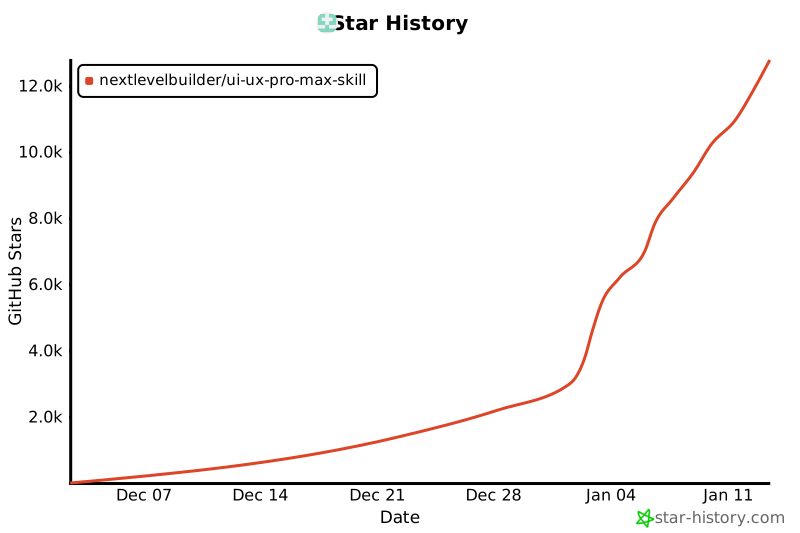](https://star-history.com/#nextlevelbuilder/ui-ux-pro-max-skill&Date) ## License This project is licensed under the [MIT License](LICENSE).
价格
免费
- 安装:免费
在组织开通时一次性收取;再次读取清单或下载不重复收费。
以上为公开标价。你的组织可能有协议价,以控制台显示的价格为准。
如何使用
为组织安装
开通即安装:组织固定使用开通时的版本(当前为 1.0.1),它包含的商品会一并开通。
创建凭证
客户端使用组织凭证读取;绑定到数字人后,数字人使用绑定凭证按需加载。请求中携带:
Authorization: Bearer $ZGI_MARKET_KEY读取清单与安装包
清单列出版本、文件和校验值;安装包是一个 zip 文件。
读取清单 curl "https://market-api.zgi.im/v1/market/plugins/ui-ux-pro-max/manifest" \ -H "Authorization: Bearer $ZGI_MARKET_KEY"下载安装包 curl "https://market-api.zgi.im/v1/market/plugins/ui-ux-pro-max/package" \ -H "Authorization: Bearer $ZGI_MARKET_KEY" \ -o ui-ux-pro-max.zip读取清单和下载安装包不计入用量。下载后请用响应头中的 SHA-256 校验文件。
插件清单
- 名称
- ui-ux-pro-max
- 版本
- 2.0.0
- 作者
- nextlevelbuilder
- 说明
- AI-powered UI/UX design system generator with 100+ industry-specific reasoning rules, 57 UI styles, 95+ color palettes, 56 font pairings, and intelligent design recommendations across 12 tech stacks.
- 格式
- Claude CodeAgent Plugins(Codex 等)
- 安装包
- 附带可安装的插件包
插件包内容
- 技能
- 1
- 命令
- 0
- 智能体
- 0
- MCP 服务
- 0
- 钩子
- 0
包含的商品
安装插件时会同时为你的组织开通它包含的商品,每个商品按各自的价格和用量计费。
来源与审核
- 审核状态
- 尚未审核,内容来自上游来源
- 许可证
- MIT
审核状态是平台对上架信息的记录,不构成对上游服务质量或可用性的担保。
相关商品
- 插件插件
taskmaster
Claude Code 插件 - 基于AI的任务管理系统,提供命令、代理和 MCP 集成
- productivity
- plugin
- valuz
免费 - 插件插件
交易智能体(多角色辩论式)
基于多角色辩论方法论的系统性投资分析:技术/基本面/新闻/情绪分析 → 多空辩论 → 交易决策 → 三方风险评估,输出 BUY/SELL/HOLD 建议。数据源使用当前环境可用的金融数据 skill / 连接器。
- quant-trading
- finance
- plugin
- +1
免费 - 插件插件
algorithmic-art
使用 p5.js 创建算法艺术,支持种子随机性和交互式参数探索。适用于生成艺术、流场、粒子系统等代码艺术创作。
- design
- plugin
- valuz
免费